Sunday, January 10, 2016

Getting started with web2py framework


    Full Stack web development with Python (Web2Py)
    How to download and install web2py
1.  Go  to http://web2py.com/
2.   Down load latest version http://web2py.com/init/default/download
     Unzip the downloaded file
     CliCk on the Web2py.exe file to it will open the window like below
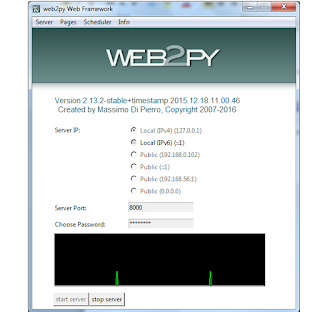


           Provide the password(any password) and start the server
           Server has been started. Now we need to create a application using web2py framework.
           http://localhost:8000


         Click on the Admin,  which is there on the right side in the page. And provide the password which      we have given while starting the server


                After Successful Login,  page will be open like below.

               Create a new application using this framework- > New simple application –
       Application Name - ex: sivaweb2py
              Click on the create button. Now we have created application successfully.
               Need to run the application
               http://localhost:8000/sivaweb2py


              Now we need to write sample code in this application. So we need to understand basics of  the
       framework
               Need to edit the application


      This framework will follow MVC architecture
          Model- Contains db details
         Controller – Method and logic details
         Views – Html input/output to the user

Now we need to create one controller and respective views
Click on the Create button under Controller Section
I have given controller name as basics – basics.py will be created under controller

       Now edit the controller – Click on the basics.py
     def helloworld():
     msg= "Hello welcome to basics controller!"
     return locals()


 In the above code helloworld is method name . Copy the code and paste the same in your file.
  Save the file and go to back – by click on the back buton
  Now we need to create a  view- under Views section
  View name should be as method name  ex: basics/helloworld

   {{extend 'layout.html'}}
    This is our first web page
   {{ =msg}}

Writing first web2py is very easy


Monday, December 14, 2015

Getting started with Oracle Stored Procedure and parse clob xml data and cursor


This Post will having the details to create stored procedure in oracle and parsing the clob data through stored procedure.
employee.xml
-------------


  siva
  32
  M

Above xml will be stored as clob data in Person table

Person table Schema -

Id NUMBER,
Name Varchar2(50),
employee_details clob

Above xml will be stored as clob data in Person table
create table PERSON (Id NUMBER, Name varchar2(50), employee_details clob);
  create table EMPLOYEE (Name varchar2(50), age NUMBER ,sex varchar2(10));
We need to parse the clob data using oracle procedure

create or replace PROCEDURE SP_PARSE_CLOB (person_id NUMBER) AS
  PERSION_ID Person.id%type;
  PERSON_NAME Person.name%type;
  EMPLOYEE_DETAILS Person.employee_details%type;
  name varchar2(50);
  age varchar2(50);
  sex varchar2(50);
  EMPLOYEE_exc EXCEPTION;
  -- Create a cursor
 cursor personDataCursor IS SELECT id, Name,employee_details from PERSON;
 BEGIN
   OPEN personDataCursor;
 LOOP
 FETCH personDataCursor into PERSION_ID,PERSON_NAME,EMPLOYEE_DETAILS;
 EXIT WHEN personDataCursor%notfound;
 IF XMLTYPE(EMPLOYEE_DETAILS).existSNode('/Employee/name/text()') > 0 THEN
   name := XMLTYPE(EMPLOYEE_DETAILS).extract('/Employee/name/text()').getStringVal();
 END IF;
 IF XMLTYPE(EMPLOYEE_DETAILS).existSNode('/Employee/age/text()') > 0 THEN
  age := XMLTYPE(EMPLOYEE_DETAILS).extract('/Employee/age/text()').getStringVal();
 END IF;
 IF XMLTYPE(EMPLOYEE_DETAILS).existSNode('/Employee/sex/text()') > 0 THEN
  sex := XMLTYPE(EMPLOYEE_DETAILS).extract('/Employee/sex/text()').getStringVal();
 END IF;
 dbms_output.put_line('Name:'|| name|| ' ' || 'Age:' || ' ' ||age || ' ' || 'Sex:' || ' ' || sex);
 -- Inset into another table
BEGIN
  insert into EMPLOYEE(name,age,sex) values(name,age,sex);
 EXCEPTION
    WHEN OTHERS
   THEN
    RAISE EMPLOYEE_exc;
  END;
  commit;
  END LOOP;

EXCEPTION
    WHEN EMPLOYEE_exc
      THEN
        rollback;
     -- Do what ever you want like insert log details in any another table
    commit;
    DBMS_OUTPUT.PUT_LINE ('Insertion failed in EMPLOYEE : '|| '' || name);
    END;

AddToAny

Contact Form

Name

Email *

Message *